Anbernic RG35XX Plus with KNULLI
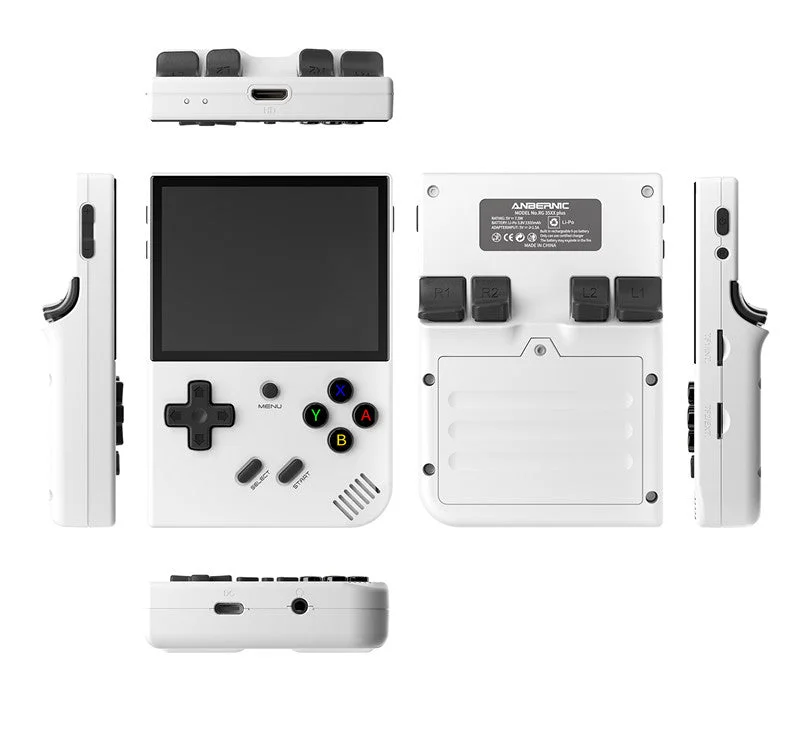
Quick Resume: verify shutdown and restored progress
Settings changed back? Check KNULLI configuration layers
KNULLI Pokémon shortcuts: scope, persistence and conflicting actions
KNULLI second card: fresh setup, migration and Pokémon save checks
GBA games missing in KNULLI? Check active SHARE, transfer and gamelist
GBA Pokémon: from patch to KNULLI library
- Match your exact Plus model to the KNULLI device instructions. Back up the old card, flash the matching image and let first boot finish. Follow the quick-start guide; choose your game storage before copying files.
- Check your hack's base game, region and revision. Use the creator's patch, then copy the resulting
.gbagame to the GBA folder under KNULLI'sromsstorage. Consult the folder guide for your card setup. - Inspect the selected emulator in Advanced Game Options. Match the creator's requirements to the choices in your installed build. If using the mGBA core, its documented cartridge save format is
.srm; states are separate. - Check the D-pad, A/B, shoulders, Start and Select. Save in-game, exit normally and reopen through Continue before starting a long playthrough.
Keep settings after restarting
KNULLI documents that emulator configuration is generated from EmulationStation settings when a game launches. Use its per-game or system settings for persistent changes; an adjustment only made in the emulator menu may disappear after reopening.
Keep progress safe
KNULLI documents /userdata/saves as the save and state storage area. Locate the actual in-game save created by your selected emulator and back it up before changing core, firmware or hack version. Test a copy when importing progress. A save state is not a substitute for the cartridge save.
Specific hack speed, fast-forward, clock events, suspend/resume and trading remain untested here. The listed screen is one display; DS layout and input need a separate assessment.
Pick your GBA adventure
- Pokémon Unbound — base: Pokémon FireRed (English v1.0); patch: UPS patch; verify the included README and base-game match.
- Pokémon Heart & Soul — base: Pokémon Emerald Version (U); patch: UPS patch; check the current developer release for the exact asset name.
- Pokémon Inclement Emerald — base: ; patch: .
Compare GBA handheld paths · GBA emulator and save checklist · Check your base file · Patch locally
Documented specifications and setup
Model covered: RG35XX Plus (H700), KNULLI setup; not the original RG35XX, H or SP. These details come from the named sources, not our measurements.
| Feature | Listed specification | Source |
|---|---|---|
| Screen | 3.5-inch IPS, 640 × 480, full lamination | Anbernic: RG35XX Plus specifications |
| Processor and memory | Allwinner H700, quad-core Cortex-A53 at 1.5GHz; 1GB RAM | Anbernic: RG35XX Plus specifications |
| Storage | Dual microSD slots; verify the included card configuration | Anbernic: RG35XX Plus specifications |
| Battery capacity | 3300mAh; runtime not measured by Pocket Deal Radar | Anbernic: RG35XX Plus specifications |
| Size and weight | 117 × 81 × 22mm; listed weight 186g | Anbernic: RG35XX Plus specifications |
| Software route | KNULLI documents this exact Plus model with an EmulationStation frontend | KNULLI developers: RG35XX Plus device |
What to check before buying
Buy the exact Plus model
Match RG35XX Plus and H700 before choosing an installation image. Other RG35XX variants have separate device pages and instructions. Read the official explanation
Plan the SD-card setup
Back up existing files before flashing. Use the current device-specific KNULLI image and let first boot prepare storage. Choose single- or dual-card storage before copying games. Read the official explanation
Check the game's emulator requirement
Use Advanced Game Options or system settings to inspect available emulator choices. The selected core and defaults depend on your installed build; this page does not claim an exact default GBA core. Read the official explanation
Check the actual purchase
Confirm condition, card contents, delivery and return terms. Seller bundles are not proof that a particular Pokémon hack is correctly patched or compatible. No live price or stock is tracked.
Hands-on findings
No original tests have been recorded. We do not give an FPS estimate, battery-life verdict, review score or blanket game-compatibility recommendation from specifications alone.
ROM hacks and standalone games
Compare Retroid Pocket 5 and Miyoo Mini Plus for Pokémon
Compare Miyoo Mini Plus with Onion and Steam Deck for GBA ROM hacks.
First identify the installation format. A ROM hack needs its matching base game and a suitable way to run the patched file. A standalone fangame has separate runtime and operating-system requirements. The device specifications above do not verify either game on this unit.
Read standalone games versus ROM patches, check the catalog's platform requirements or use the game Finder. The ROM checker and ROM patcher process your own files locally; they do not certify handheld performance.
Sources and buying links
- Anbernic: RG35XX Plus specifications
- KNULLI developers: RG35XX Plus device
- KNULLI developers: quick start
- KNULLI developers: game storage
- KNULLI developers: emulator and game settings
- Libretro: mGBA file formats and saves
Sources are the manufacturer or software developers named above. There are no affiliate buying links on this page. Specifications and software can change; check the exact device and game before buying.
Based on the creator's documentation, checked 4 Oct 2026. Not hands-on tested unless a section says 'We played it'.
How we check